


Sense Home
3.9488.00 Reviews
App Specs
- Version
- 2026.12
- Updated On
- License
- Free
- Downloads
- 100,000+
- Developer
- Sense Labs, Inc.
- Categories
- House & Home
- Platform
- Android
Screenshots


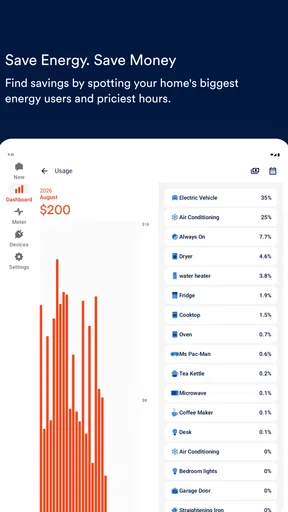
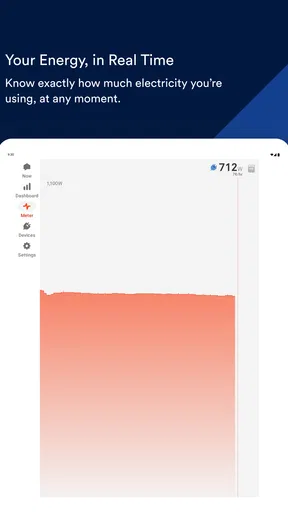
 Analysis by AppCompare
I found Sense Home most useful when I stopped treating it as a simple electricity dashboard and started using it as a shared household reference point. In a home where several people switch appliances on and off, it can make energy use easier to discuss because everyone is looking at the same picture instead of guessing from the monthly bill. I could check what appeared to be running, look for unusual activity, and use that information to make small decisions about daily routines.
That makes this free House & Home app from Sense Labs, Inc. more interesting than a basic bill calculator. It is designed for people who want visibility into their electric use, with the added practical goal of spotting something that should not be running. The idea is straightforward, but the value depends heavily on how your home is equipped and how consistently the household uses the information.
How Sense Home fits into a shared household
I find a shared energy dashboard works best when it helps housemates agree on a routine, not when it becomes a way to judge one another. In this section, I’d focus on how to make that shared view useful while keeping expectations about access and interpretation clear. That foundation matters before deciding what the household should do with an unusual pattern.
A useful common view instead of household guesswork
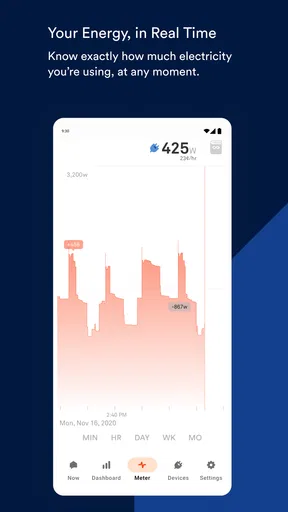
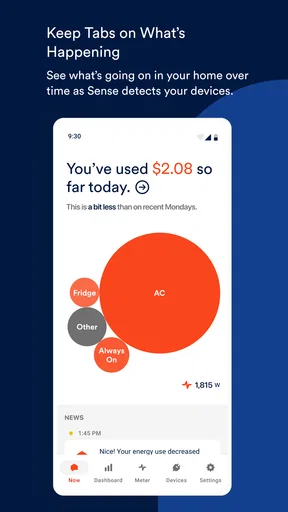
In a shared home, electricity is often invisible until the bill arrives. One person may assume the high usage came from heating, another may blame the kitchen, and nobody may know whether a device in a spare room was left on. Sense Home gives the conversation a more concrete starting point. I can imagine checking it before leaving the house, after returning from a trip, or when a bill seems unexpectedly high.
The strongest everyday scenario is a home with several occupants and no single person who knows every appliance routine. Someone leaves for work, another person works from home, and a third person uses the kitchen or laundry later in the day. Rather than asking everyone to remember what they did, the app can help reveal the household pattern. That does not remove the need for communication, but it can reduce the amount of guesswork.
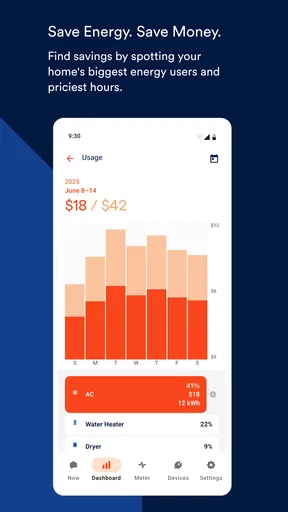
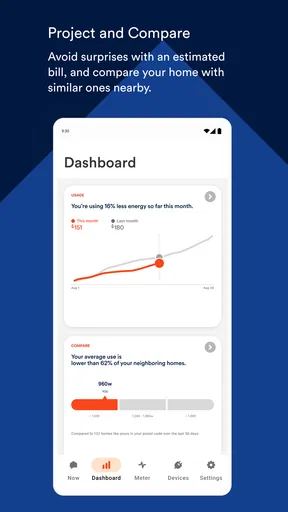
I also like the potential for a simple “before and after” habit. If the household changes a routine, such as being more careful with laundry timing or switching off equipment in a rarely used room, the app can help you observe whether the home’s electrical activity looks different afterward. I would not treat every change as proof of savings, but the visual feedback can make an abstract goal feel more tangible.
The most valuable habit is checking for patterns, not obsessing over every fluctuation. A home naturally uses different amounts of electricity at different times. A single spike is not automatically a problem, and a quiet period does not guarantee that every appliance is off. Sense Home works better as a tool for noticing repeated behavior than as a reason to monitor the screen constantly.
Worth Reading Before You Choose

EA SPORTS FC Mobile 26 Is a Bigger Football Game, but It Takes Time

Flipboard Shows What News Apps Must Do Beyond the Feed

Switching to Android Auto Means Rethinking Your Driving Routine

Google Calendar Makes a Crowded Week Easier to Manage

Ludo King Makes the Most of the Minutes Between Plans

Baby Panda World Brings Quick Play to Modern Phones, but Its Game Library Feels Busy
Where the shared-device idea becomes complicated
A household dashboard is only helpful when the people using it understand what they are seeing. If one person checks the app and immediately assumes another person caused a high reading, the technology can create friction instead of solving it. I would use the information to ask better questions, not to assign blame. “What was running around then?” is more useful than “Who left this on?”
There is also a practical distinction between shared access and shared responsibility. The app may help everyone understand the home’s electrical activity, but it does not replace a household agreement about who checks unusual activity, who investigates an appliance, or who decides whether a routine should change. I would establish those expectations before making the app part of a family or roommate system.
For a couple or a small household that already communicates well, this can be a convenient common reference. For a busy home where people want strict individual accountability, it may feel less precise than they expect. Electrical use belongs to the home, while daily actions belong to individuals, and those two things do not always line up neatly.
What setup expectations should be clear first
Sense Home is not a standalone meter-reading trick that can magically explain every appliance in every property. Its usefulness depends on the compatible Sense hardware and the electrical information available to it. Before building a household routine around the app, I would confirm that the home has the necessary setup and that the person responsible for installation is comfortable managing it.
This matters especially in rented homes, shared properties, or houses where the electrical panel is not under the everyday control of the app user. An app can be free while the surrounding equipment and installation decisions still require planning. I would not assume that downloading it alone provides the monitoring experience described by its purpose.
The setup boundary is important for another reason: the person who establishes the system may become the de facto administrator of the household’s energy information. That can be fine in a family home, but it deserves a conversation in a roommate arrangement. Everyone should know who can view the information, who will interpret it, and how the household will handle a warning or an unexpected pattern.
Account boundaries and practical trust
When an app is used around several people, I pay attention to the difference between household visibility and personal surveillance. Sense Home is about the home’s electrical activity, not a diary of who was in which room. Still, a shared dashboard can invite assumptions about people’s schedules. I would avoid presenting it as a way to monitor another person’s behavior.
A sensible arrangement is to keep the discussion focused on appliances, routines, and safety. For example, if the home appears to be using power while everyone believes it is empty, the next step should be checking likely equipment and confirming whether someone is actually home. It should not be treated as automatic evidence that a particular person ignored an instruction.
This is also where age context matters. An adult can understand that an electrical pattern is only an indirect clue. A child may interpret a chart or alert more literally, especially if adults frame it as proof that somebody did something wrong. I would keep the app’s role educational and practical for younger household members, with an adult handling decisions that involve the electrical panel or potentially unsafe equipment.
Using the app to coordinate small household decisions
The best coordination workflow is simple. One person notices a recurring pattern, the household discusses what might explain it, and someone makes one manageable change. After that, the group checks whether the pattern changes over time. This approach is more realistic than trying to redesign the entire home’s energy habits in one evening.
For example, a household might notice that electrical activity remains higher than expected late at night. Instead of assuming the cause, I would make a short list of likely sources: entertainment equipment, office devices, cooling, heating, chargers, or appliances that cycle automatically. Then I would check the home in person and change only one or two routines. The app becomes a prompt for investigation rather than a substitute for it.
Another useful workflow is preparing for an absence. Before leaving for a weekend, the household can agree on what should remain active and what should be switched off. A later check can provide reassurance that the home’s pattern looks broadly consistent with that plan. I would still avoid relying on the app as the only safety measure; physical checks and appropriate appliance precautions remain more important.
In a roommate home, coordination may be even more valuable than savings. People often have different assumptions about shared appliances, portable heaters, laundry, and work equipment. A common view can support a neutral conversation about routines. The trade-off is that everyone must accept that the information may be incomplete or difficult to attribute to one device or person.
Tips that make the monitoring more useful
First, I would establish a baseline before trying to optimize anything. Use the app during ordinary days and note the household’s normal rhythm: when activity rises, when it falls, and which periods are naturally busy. Without that baseline, normal cooking or climate-control behavior can look suspicious.
Second, investigate repeated patterns rather than isolated moments. A one-time increase may come from an ordinary task, while a recurring overnight pattern is more worthy of attention. This is a less obvious but important trade-off: the app can make electricity visible, yet visibility does not automatically provide a perfect explanation.
Third, use the information to prioritize checks that are easy and safe. I would start with accessible appliances and ordinary household routines, not by opening electrical equipment or experimenting with anything dangerous. If the concern involves wiring, the panel, burning smells, heat, or an appliance behaving abnormally, the app should be treated as a clue and not as a technical diagnosis.
Fourth, agree on a shared vocabulary. In a household, “something is running” can mean an appliance is actively operating, a device is drawing standby power, or the home is simply in a high-use period. Clarifying what everyone means prevents the dashboard from turning into an argument over labels.
Age context, trust, and responsible use
The app has an Everyone content rating, which makes its general presentation suitable for a broad audience. That does not mean every part of household energy monitoring should be handed to a child without guidance. The useful lesson for younger users is that electricity has a cost and that appliances should be used thoughtfully. The unsafe lesson would be encouraging them to investigate electrical equipment on their own.
I would involve children through simple, low-risk tasks: noticing when lights or entertainment devices are left on, learning why adults check appliances before leaving, or comparing a planned routine with what the household actually did. The adult remains responsible for interpreting unusual activity and deciding whether professional help is needed.
Trust also matters between adults. If one person controls the account or becomes the only person who interprets the information, other household members may feel excluded. A short explanation of what the app can show, what it cannot prove, and how the household will respond to unusual activity makes the tool feel collaborative rather than intrusive.
For privacy-conscious users, I would think carefully about where the app fits in the home’s digital life. The main question is not simply whether monitoring is useful, but whether every person affected is comfortable with the arrangement. In a family home, that conversation may be easy. In a shared rental, it should happen before the system becomes part of the household routine.
How it compares with ordinary alternatives
The most common alternative is doing nothing beyond reading the utility bill. That is easier, but the bill arrives too late to explain which routines shaped the result. Sense Home is more useful for people who want ongoing visibility and are willing to spend time learning their home’s normal behavior.
Another alternative is using plug-in energy meters on individual devices. Those can be more direct when the goal is to measure one appliance, especially a desk setup or a single refrigerator. Sense Home has a broader household perspective, which is better for spotting the overall rhythm of a property, but a plug-in meter may be the clearer choice when you need a focused answer about one accessible device.
Smart plugs and connected appliances offer another kind of control. They can be convenient for switching certain devices remotely or automating routines, while Sense Home is primarily valuable for visibility into the home’s electrical activity. If your main goal is automation, a smart-home platform may suit you better. If your main goal is understanding what the home is doing as a whole, Sense Home has a more relevant role.
A spreadsheet can also work for disciplined households, but it depends on manual readings and consistent record keeping. The app is more convenient for people who will not maintain a detailed log. The trade-off is that convenience can make the information feel more authoritative than it really is. I would still use common sense and direct observation when interpreting it.
Who should use it, and who should skip it
I would recommend Sense Home to homeowners and technically comfortable households that want to understand electrical behavior over time, coordinate energy habits, or notice activity that deserves a closer look. It is especially promising for people who enjoy turning vague concerns into observable patterns and who are prepared to discuss the results calmly with everyone sharing the home.
I would be more cautious for renters, households with complicated account boundaries, or anyone expecting a download to provide complete appliance-level certainty without compatible equipment and setup. It may also disappoint users who want a precise explanation for every reading, immediate savings, or a fully automatic safety system.
The current version is 2026.11, and the app has been available since Aug 31, 2016. Its store presence shows a 3.9 average from around 1.8 thousand ratings, with over 100 thousand installs and around 488 written reviews. Those figures suggest a real user base, but I would still judge it by whether its monitoring approach matches your home rather than treating popularity as proof that it will fit every electrical setup.
It is free to download and rated for Everyone, which lowers the barrier for exploring the software side of the experience. The minimum operating-system requirement is version 10, so I would check that an older phone or tablet is compatible before planning to use it as a shared household screen.
My household verdict
Sense Home is most convincing when used as a calm, shared observation tool. I would not install it expecting a magic button that cuts the electric bill or identifies every device with perfect certainty. I would install it to make the home’s electrical habits easier to see, then use that visibility to guide small, sensible changes.
For a household that communicates well, it can turn electricity from an invisible monthly surprise into something people can discuss together. Its strongest qualities are the broad home perspective, the possibility of noticing unusual activity, and the way it can support practical routines before and after travel or schedule changes.
Its limitations are equally important: setup matters, interpretation takes judgment, and shared monitoring can become uncomfortable if people use it to police one another. I would choose a plug-in meter for a narrow appliance question, a smart-home system for automation, and the utility bill for a simple high-level record. I would choose Sense Home when the real question is, “What is happening across this home, and what should we investigate together?”
That makes it a worthwhile option for the right household, not a universal answer. If you are ready to establish clear account boundaries, involve the people who share the space, and treat patterns as clues rather than accusations, this House & Home app can become a practical part of everyday energy awareness.
Pros
- Clear overview of app usage and device activity in one place.
- Useful insights can help identify habits and improve digital wellbeing.
- Simple interface makes key information easy to find.
- May help monitor mobile data and battery usage more effectively.
- Lightweight design should be accessible on a wide range of devices.
Cons
- Some features may depend on device model or Android system permissions.
- Usage reports can feel limited without long-term tracking history.
- Background monitoring may have a small effect on battery life.
- Privacy-conscious users may dislike the permissions required for insights.
- The app’s usefulness may vary depending on network and carrier support.
FAQs for Sense Home
What is Sense Home and what does it do?
Sense Home is a mobile launcher and personalization app designed to organize your Android device and make frequently used content easier to reach. It can combine app shortcuts, news, recommendations, weather information, and other useful panels in one interface. After installation, it may replace or work alongside your phone’s default home screen, depending on the permissions and settings you choose.
Is Sense Home free to download and use?
Sense Home is generally available as a free download, although the exact availability, features, and advertising model may vary by device, region, and app version. Some recommendations or promotional content may appear within the interface. Before installing, users should review the Google Play listing for current pricing, in-app purchase details, supported devices, and the latest privacy information.
Does Sense Home require special permissions?
To provide launcher features and personalized recommendations, Sense Home may request permissions related to apps, device usage, notifications, location, or network access. The exact list depends on the version and your phone’s Android settings. You can review or deny permissions, but restricting them may reduce features such as contextual suggestions, weather updates, or integrated notifications.
Can I make Sense Home my default launcher and change it later?
On compatible Android phones, Sense Home can usually be selected as the default launcher so that it appears whenever you press the Home button. You are not permanently locked into that choice. The default launcher can normally be changed through Android’s Apps or Home app settings, although the menu names may differ slightly between manufacturers and Android versions.
Is Sense Home suitable for every Android phone?
Sense Home was designed primarily for Android devices, but compatibility and performance can differ considerably between phones. Older hardware, customized Android interfaces, or newer operating-system versions may affect how smoothly it works. Before downloading, check the app’s current compatibility information and user reviews. Also remember that launcher behavior, available widgets, and integration features may vary by manufacturer.


